
Unlock All VIP 18 Skins & Golden Dragon Base with MacroQ: The Ultimate Last War Guide

The Prestige of VIP 18 in Last War: Survival
In the competitive world of Last War: Survival, reaching VIP 18 represents the pinnacle of power and elite prestige. Traditionally, unlocking this tier requires tens of thousands—if not hundreds of thousands—of dollars in premium bundles.
Along with this elite status comes unparalleled visual distinction: radiant sovereign headquarters enveloped in protective energy auras, futuristic Mecha combat drone skins, and blazing plasma march trails that turn heads across the entire world map.
Now, you don't need a royal fortune to enjoy this aesthetic brilliance. With the Mod Skin feature built directly into the MacroQ Studio main menu, every commander can activate the full collection of over 300+ VIP 18 skins with a single click!
1. What Does the VIP 18 Skin Collection Include?
MacroQ's dedicated Mod Skin dashboard organizes all top-tier cosmetics into clear categories:
2. 3-Step Walkthrough: Activating Mod Skin in MacroQ
Activating your new appearance takes place right inside your game window in 3 effortless steps:
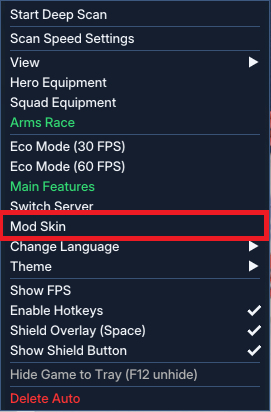
Step 1: Select "Mod Skin" from the Main Menu
On your Last War: Survival game window, open the quick MacroQ control menu and select the "Mod Skin" option.
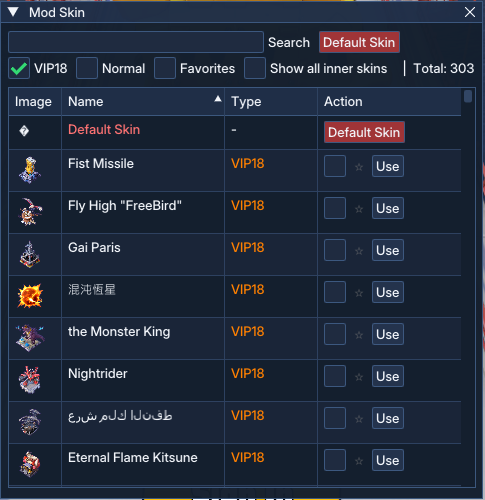
Step 2: Choose Your Favorite Skin in the Dedicated Dashboard
The dedicated Mod Skin window displays over 300+ premium assets. Simply:
Step 3: Witness the Stunning Real-Time In-Game Result
Instantly—with zero game restarts required—your headquarters transforms into a majestic VIP 18 Golden Dragon Fortress dominating the global map!
3. Mechanics & Zero-Ban Safety Guarantee
A natural question for many commanders: Does modifying skins risk an account penalty or detection by the game publisher?
The answer is 100% Safe and Undetectable, guaranteed by MacroQ's client-side architecture:
Feel completely confident recording gameplay videos, streaming live, or sharing victory screenshots with your alliance.
4. Combine Elite Visuals with 24/7 Automation
Elite appearances deserve unmatched progression speed. MacroQ Studio pairs stunning visuals with around-the-clock tactical automation:
Start Your 3-Day Free Trial Today
Elevate your battlefield aesthetics and accelerate your path to Tier 10 (T10) troops today. Download MacroQ Studio now and claim your 3-Day Full VIP Free Trial!
YENİ NESİL MOBİL STRATEJİ OYUNU OTOMASYON EKOSİSTEMİ.
PC'nizde hafif arka plan yardımcıları çalıştırarak SLG mobil strateji oyunlarını optimize edin. Kaynak toplama, hastane tedavisi, ittifak mitingleri ve 7/24 kalkan koruması.